Less word-by-word
busywork.
Regroup existing auto-captions into short, karaoke-style phrases with a moving highlight.
makethenextcut.
Caption grouping illustrationA SKILL FOR YOUR NEXT EDIT V2.1.0
Create karaoke captions, prepare silence cuts, and add overlays to your existing project. Reopen CapCut and make the final edit yours.
CapCut Desktop + Claude Code · macOS & Windows
“Make the caption highlight green.
Keep the rest of my edit.”
THE PART YOU DIDN’T SIGN UP FOR
Your agent already helps you build.
Let it help with the caption pass, too.
The
taste? That’s still yours.
Regroup existing auto-captions into short, karaoke-style phrases with a moving highlight.
Find dead air and prepare a keep-segment list your agent can use to rebuild the video track.
Silence-cut illustrationAdd your B-roll, titles, audio, and prepared overlays as tracks. Keep polishing everything in CapCut.
THE PROOF IS IN THE PROJECT
A real caption-styling edit.
Watch the request, the handoff,
and the reopened
project.
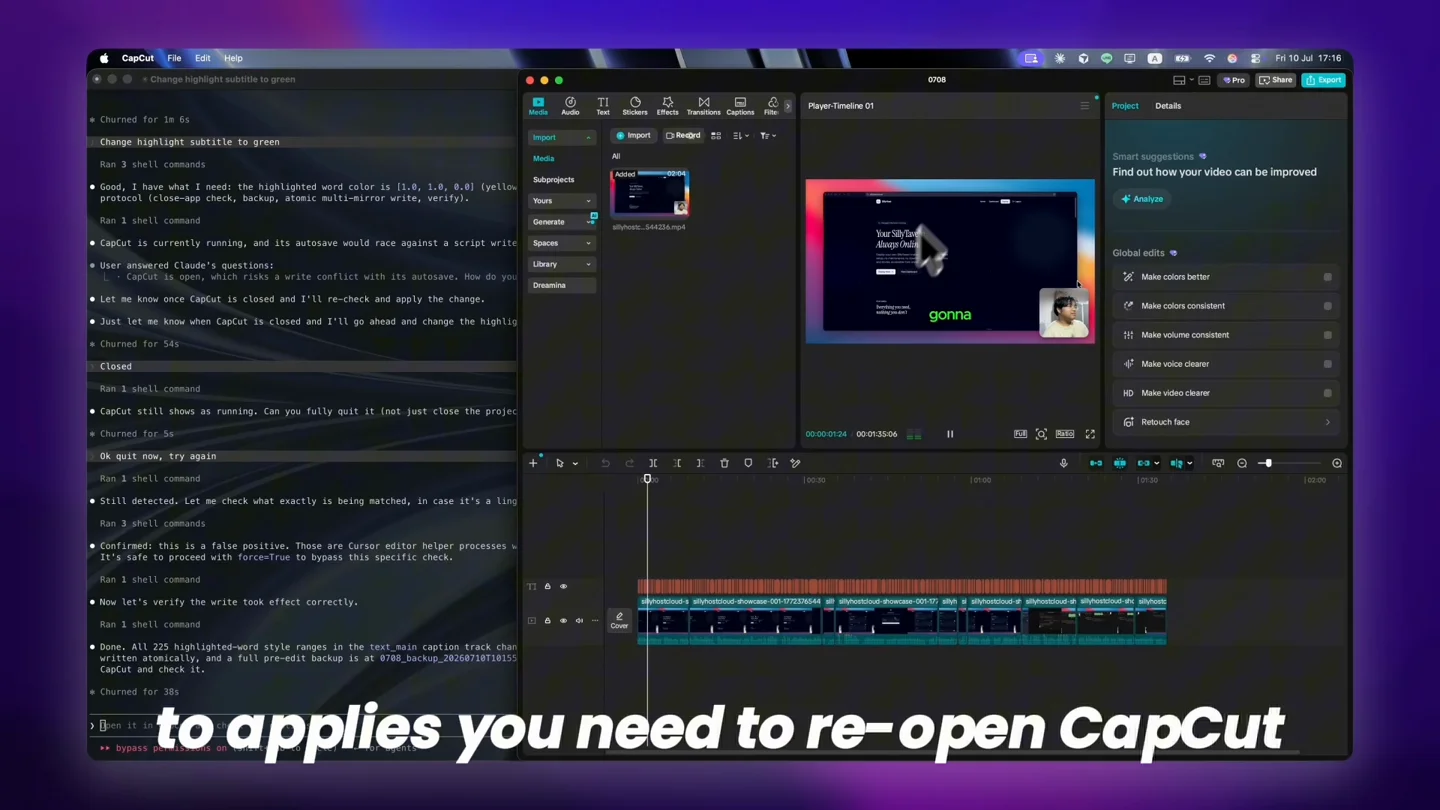
The recording shows Claude Code inspecting a local CapCut draft. The requested edit is to turn subtitle highlighting green. CapCut is closed for the edit, then reopened to show the updated caption styling. The presentation contains cuts and zooms; it is not an elapsed-time benchmark.
YOUR PROJECT COMES BACK TO YOU
The agent changes the draft. You reopen it, check the result, and keep going in the editor you know.
These frames come from the same caption-styling recording. Switch between the original and reopened project.
ONE INSTALL. A FAMILIAR HANDOFF.
Install the package into Claude Code. You’ll need Python 3.10+ and FFmpeg.
Installation guideStart with an existing project. Fully close CapCut so its autosave doesn’t overwrite your agent’s work.
“Regroup my project’s captions into karaoke-style phrases.”Check the updated timeline, refine the creative details, and export from CapCut.
A backup before every writeA LOOK AT THE OUTPUT
A finished example with Thai karaoke captions and an overlay. The package supports script-aware caption grouping across languages.
This shows the finished output, not a before/after or a full automation recording. Always review transcript accuracy and timing.
MAKE ROOM FOR THE CREATIVE PASS
For people who already use Claude Code and CapCut. Get a practical starting point for the timeline work you keep repeating.
Check your setup firstUSD · one payment
The current package. Yours to use.
No recurring fee for the skill.
Purchases open soon. Explore the demo and setup guide today.
Applicable taxes shown at checkout. Agent access and optional services are separate. Future upgrades are not included as a promise.
7-day compatibility refund
If a supported setup still fails after
email help.
Read the terms →
You get a packaged workflow: draft inspection, caption grouping, media and text tools, backup handling, installers, and reference docs. You can build your own; this gives your agent a starting point for the repetitive work and gives you email installation help.
No. It edits an existing local CapCut draft. You prepare the project, close CapCut while the agent works, then reopen it to check and finish the edit. Exporting still happens in CapCut.
This version is for CapCut Desktop on macOS and Windows. It needs access to local draft files. It does not work in the mobile or web app.
You need your own access to Claude Code or another compatible agent. That usage is separate. Local Whisper transcription is included without a paid transcription API; optional ElevenLabs or Gemini usage costs extra. Your normal CapCut plan and asset requirements still apply.
Email us with your order reference, software versions, and the error you see. If setup still fails on a documented supported configuration after email troubleshooting, request a compatibility refund within 7 days of purchase.
Yes. The license covers your own editing, including paid client projects. One license is for one person. You cannot redistribute or resell the skill. The purchase covers the current package; future upgrades are not promised.
The skill works with local CapCut files and offers local transcription. Your agent provider may process prompts and context, and optional cloud transcription sends media to that service. Local editing does not mean the entire workflow is offline.